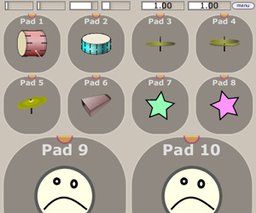
Build a custom MIDI control surface in your DAW with configurable pads, sliders and XY controls—assign notes or CCs, add images, and scale the interface to your
Description
If you need a fast way to sketch out a personalized MIDI control surface inside your host, midiPads is a lightweight VST2 that gets the job done. It runs on Windows and lets you assemble banks of pads, faders and XY-style controllers that fire MIDI notes or send continuous controller data. I like using it for sample triggering, hands-on automation, or setting up quick performance templates without extra hardware.
What you get
- Flexible layout: create configurations that support up to 128 pads and organize layouts with between 1 and 64 controls per bank to match your workflow.
- Assignable outputs: individual controls can transmit note messages and/or CC data, and MIDI-learn makes mapping to external gear or soft synths straightforward.
- Visual customization: add text, color accents and custom icons for fast recognition; drag-and-drop images (PNG, JPG, SVG, GIF) to personalize each control.
- Resizable interface: scale the GUI to fit a laptop screen or a big monitor so your performance view is always comfortable.
- Perfect for producers and live performers who want a fast, software-based controller for triggering clips, tweaking effects, or shaping synth parameters.
Information
- Developer
- Insert Piz Here
- License
- Freeware
- Price
- Free
- Platforms
- Windows
- Formats
- VST2
Rate this software
Login to rate.


