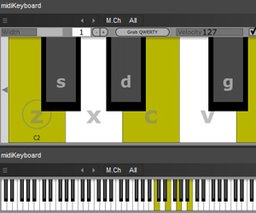
A lightweight, resizable on-screen piano that lets you play and inspect MIDI notes via mouse, your computer keys, or an external controller.
Description
midiKeyboard is a no-nonsense on-screen keyboard that makes it easy to play, test and visualize MIDI notes inside your DAW. Resize the interface to suit your workflow, tweak the width of the keys, pick the MIDI channel you want to watch, and trigger notes with a mouse, your computer typing keys or an attached MIDI controller. It also lets you control dynamics by using the vertical position of your mouse when you click, and includes a modifier to quickly shift the octave assigned to your computer keyboard.
Key features for quick sketching and debugging:
- Resizable window and adjustable key width so the layout fits your screen.
- Selectable MIDI channel for focused monitoring.
- Play via mouse, computer keyboard (QWERTY), or incoming MIDI messages; hold Shift and click to change the typing-key octave.
- Optional vertical-mouse-to-velocity mapping for expressive clicks.
- Sticky/latch mode to keep notes sounding without holding input, plus a quick stop-all action using middle-click or Ctrl-click.
- Contextual right-click behavior that toggles or momentarily plays keys depending on the latch setting, and a compact mode that hides controls to show only the keys.
If you’re a producer, sound designer, or plugin developer who needs a simple, reliable MIDI input tester or a tiny playable keyboard inside your project, this tool is a handy addition. It’s especially useful for sketching ideas, debugging MIDI routings, or playing virtual instruments when you don’t have a hardware controller at hand.
Information
- Developer
- Insert Piz Here
- License
- Freeware
- Price
- Free
- Platforms
- Windows, macOS
- Formats
- VST2
Rate this software
Login to rate.


