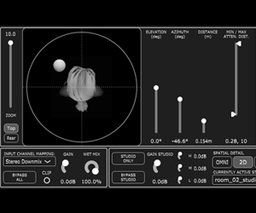
Transform headphone mixes with a precision 3D spatializer that sharpens placement, adds depth, and makes sounds feel outside the listener's head.
Description
Anaglyph brings advanced spatial control straight into your DAW so you can place elements with convincing depth and direction on headphones. I started using it to move sounds around a mix in ways that actually read as real space, not just widened stereo. It gives you hands-on tools to tweak timing and level cues, fine-tune near-field behaviour and pick different head-filtering profiles so instruments sit naturally in front, behind or beside the listener.
It’s ideal for music producers, sound designers and immersive audio creators who want accurate headphone staging without complicated routing. Key capabilities include:
- Customizable interaural delay shaping for more natural left/right timing differences
- Level compensation that helps close sources feel appropriately intimate
- Selectable head-related filtering options to alter perceived angle and depth
- Controls to increase perceived externalisation so sounds feel outside the head
- A localisation enhancer to sharpen positional clarity in dense mixes
Use Anaglyph to make virtual instruments, ambiences and Foley sit convincingly in 3D space, to improve headphone reference mixes, or to prototype spatial ideas for VR and game audio. If you mix primarily on headphones and want better, more believable placement, this plugin is worth adding to your toolkit.


